Agency Insite documentation

Run the platform without waiting on someone else.

Search the product, follow the workflow, and get the answer in context. Updated for Agency Console 3.20.3.

Documentation

Start Here

Get oriented, sign in, and understand how the workspace is organized.

Start Here

What is Agency Insite?

Overview

A white-label operating system for agencies that keeps client work, delivery, communication, reporting, finance, and growth in one connected workspace.

Agency Insite is designed to replace the collection of point tools agencies often use for client portals, project delivery, onboarding, reporting, billing, social publishing, email workflows, and document production.

The operating principle

Customers and team members should not need to know which integration or back-office system powers an action. They work in one branded workspace while Agency Insite coordinates the connected systems behind it.

  • Unlimited seats and customer workspaces on every Agency Insite subscription.
  • The automated onboarding workflow keeps repeatable setup from becoming manual project work.
  • Capabilities expand by plan, rather than by user count.
  • White-label identity, access rules, and custom domains are managed per installation and tenant.
Copy section link
Start Here

Your first 15 minutes

Quick start

The shortest path from a new workspace to a usable client operation.

  1. Set your identity.Open Appearance & Access and confirm logo, colors, workspace labels, navigation, login behavior, and registration scope.
  2. Connect the systems you actually use.Add integrations for calendar, storage, payments, meetings, analytics, social channels, messaging, or AI only where they support your workflow.
  3. Create or import customers.Add customer companies, then invite the people who should have workspace access.
  4. Configure repeatable onboarding.Use project workflows so the same tasks, files, approvals, questionnaires, and milestones do not need to be rebuilt for each engagement.
  5. Check the customer view.Review the dashboard, navigation, documents, alerts, and access behavior from the customer side before scaling the setup.
Copy section link
Start Here

Sign in and password recovery

Access

Use the branded access page for authentication without exposing WordPress login screens.

The standard access route is /access/. Users can sign in with their username or email address. Password recovery also stays inside the branded access experience.

  • Logged-in users are sent to the main dashboard.
  • Logged-out behavior is configurable per installation.
  • Registration can be disabled, allowed site-wide for legacy installs, or limited to mapped white-label customer domains.
  • Public Agency Insite sales sites can offer login without offering open registration.
Copy section link
Documentation

Workspace & Access

Control navigation, identity, users, customers, and what logged-out visitors can do.

Workspace & Access

Workspace navigation

Admin

The primary workspace navigation follows the current Agency Console structure and can be relabeled without changing the underlying routes.

The primary navigation is built around Overview, Calendar, Projects, Brand Strategy, KPI, and Social/Email. Availability can vary by role, customer state, and enabled module.

Appearance & Access lets an administrator change visible labels and supported icons. Specialized views such as files, appointments, calls, and accounting can remain nested rather than being forced into the primary bar.

Keep navigation semantic

Rename items when it helps your customers understand the workspace, but keep each label aligned with the work behind it. That preserves orientation across alerts, links, and documentation.

Copy section link
Workspace & Access

Appearance & Access

Admin

Manage the visual system and public access behavior independently on each installation.

Use Agency Console → Appearance & Access for site-level identity and access controls.

  • Logo and core visual settings.
  • Workspace navigation labels and supported icons.
  • Login content and footer language.
  • Logged-out homepage: access page or public Agency Insite page.
  • Registration scope: disabled, legacy site-wide, or mapped white-label customer domains only.

Because these settings are per installation, a sales domain can have a public Agency Insite homepage while the primary app installation keeps a login-first experience.

Copy section link
Workspace & Access

Users, customers, and invitations

Core

Separate agency staff, customer companies, and invited customer users without per-seat pricing.

Agency Insite treats companies and users as separate records so one customer can have multiple invited people and one agency can grow its internal team without changing subscription price.

  • Create or import customer companies.
  • Invite people with the correct company relationship and role.
  • Use client administrators where a customer needs elevated control inside its own workspace.
  • Keep internal agency-only material out of customer-visible projects, files, notifications, and documents.
Copy section link
Workspace & Access

Custom domains and white-label access

White label

Map a branded host to a white-label tenant while keeping authentication and legal content tenant-aware.

A mapped custom domain or branded subdomain can resolve to a specific white-label provider configuration. On a recognized host, Agency Insite keeps public links on that host instead of bouncing visitors to the canonical WordPress hostname.

  • Use the mapped host for the customer-facing experience.
  • Choose whether the public landing experience is enabled for that tenant.
  • Provide tenant-specific legal copy when needed.
  • Limit registration to mapped white-label customer domains if your canonical sales site should be login-only.
Copy section link
Documentation

Client Delivery

Projects, onboarding, calendars, files, approvals, proposals, and the customer experience.

Client Delivery

Projects and automated onboarding

Core

Turn repeatable delivery into workflows instead of rebuilding the same project by hand.

Projects hold the operational work for an engagement. Workflow templates can create the repeatable structure around that work, including tasks, timing, approvals, files, questionnaires, and milestones.

  • Use project workflows for standardized onboarding and recurring engagement patterns.
  • Keep internal tasks internal and client-visible milestones customer-safe.
  • Use the shared calendar for work that has meaningful dates.
  • Let service/tactic duration and historical delivery data inform proposal roadmaps where available.
Copy section link
Client Delivery

Calendar and appointments

Core

See project work, to-dos, appointments, connected calendar events, and scheduled social content in one calendar.

The Calendar workspace combines dated work from Agency Insite with supported connected calendar data. Filters let the user choose which event types are visible without leaving the workspace.

  • Projects and tasks with dates.
  • To-dos and appointments.
  • Connected Google Calendar events.
  • Scheduled social content when Social is enabled.
Copy section link
Client Delivery

Files, versions, and approvals

Core

Keep deliverables connected to the customer and project instead of scattering review across email threads.

File records support client-aware access and version metadata. Connected Egnyte storage can participate in the file workflow where configured.

  • Attach files to the appropriate customer and project context.
  • Preserve versions rather than replacing history.
  • Use client-visible delivery and approval states for work that needs review.
  • Keep agency-only source material and internal notes out of the customer view.
Copy section link
Client Delivery

Prospect and proposal experience

Core

Secure invitation links can open a rich prospect dashboard instead of dropping a recipient into a single document.

Proposal recipients can use tokenized links to enter the prospect experience without creating an account. The experience can include the onboarding path, proposal, engagement documents, Look Book, Insights, meetings, podcast/sizzle content, and other configured prospect resources.

  • Proposal review does not require login when accessed through the secure invitation token.
  • Actions with stronger identity requirements, such as a binding Quote signature, can still require authentication.
  • Roadmap duration follows the included tactics and delivery estimates rather than forcing a fixed term.
Copy section link
Documentation

Growth

KPI reporting, social media operations, and email workflows and campaigns.

Growth

KPI Dashboard

Core

Bring business and marketing performance into the same customer context as the work that produced it.

The KPI workspace is part of the operating core. It can combine configured metrics, connected business data, analysis context, and strategic recommendations without requiring a separate reporting portal.

  • Track agency and client performance metrics.
  • Connect supported data sources through Business Connectors and integrations.
  • Use KPI analysis when the surrounding context matters as much as the raw number.
  • Keep reporting beside projects, finance, files, and strategy.
Copy section link
Growth

Social media management

Growth + Scale

Plan, approve, schedule, and publish social content from the customer workspace.

Social is available on Growth and Scale plans when the module is enabled for the tenant/customer.

  • Publishing calendar and planning rows.
  • Channel selection and connection status.
  • Draft, approval, scheduling, and publishing states.
  • Media handling and channel-specific readiness guidance.
  • Calendar visibility for scheduled posts.
Copy section link
Growth

Email workflows and campaigns

Growth + Scale

Build reusable email design, campaigns, funnels, recipient journeys, and automated rules without moving customer context to another platform.

Email workflow and campaign tools are available on Growth and Scale plans when enabled.

  • Reusable email templates and design controls.
  • Campaign creation and recipient activity.
  • Funnels and rules that can be edited, paused, and resumed.
  • Test email delivery before enabling live automation.
  • Transactional alert and billing templates are managed separately from marketing campaigns.
Copy section link
Documentation

Finance

Proposals, Quotes, invoices, subscriptions, payments, accounting, and receivables.

Finance

Accounting and billing operations

Core

Keep money movement connected to the same customer, project, proposal, and delivery records used by the team.

Accounting and billing operations are part of the Agency Insite core. Supported finance workflows include proposals, Quotes, invoices, recurring billing, subscriptions, receivables, payment links, and connected payment/accounting services.

  • Use finance records in customer context instead of a disconnected billing portal.
  • Automate recurring invoice work where the engagement calls for it.
  • Use receivables automation to follow payment status without manually rebuilding reminders.
  • Connect Zoho Payments and supported accounting imports where appropriate.
Copy section link
Finance

Proposals, Quotes, and invoices

Core

Move from proposed work to accepted terms and billing without losing the project and customer context.

Proposal generation can use discovery calls, pasted notes, or uploaded source documents. Quote and invoice workflows then carry accepted work into finance.

  • Proposal roadmaps use included tactics and available duration history.
  • Proposal and Quote PDFs can use Cover Designer, Montserrat, editable section-only contents pages, and branded interior layouts.
  • Quote signing can use authenticated identity controls.
  • Invoices can connect to payment and receivables workflows.
Copy section link
Documentation

Brand & Documents

Brand Strategy, Brand Kit, Cover Designer, document automation, review, and PDF delivery.

Brand & Documents

Brand Strategy workspace

Core

Keep questionnaires, Brandscapes, strategic documents, feedback, revisions, and client delivery in one place.

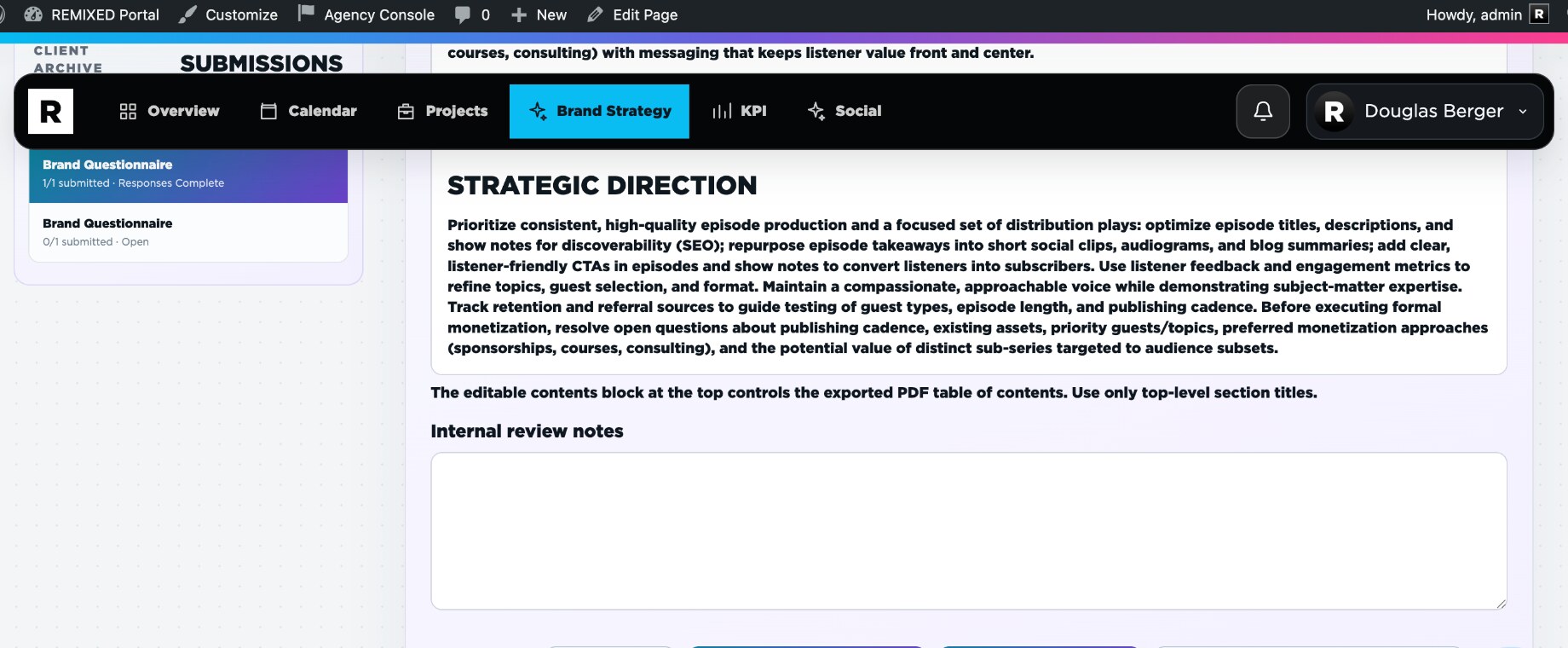
The Brand Strategy workspace connects discovery inputs to structured strategic documents and review states.

  • Questionnaires collect structured customer context.
  • Messaging Brandscapes support internal review, draft delivery, revision requests, approval, and version history.
  • Strategy documents can use approved source material and connected research context.
  • Client delivery can create versioned PDFs and trigger the configured notification workflow.
Actual Brand Strategy workspace in Agency Insite
Actual Brand Strategy workspace.
Copy section link
Brand & Documents

Brand Kit and Cover Designer

Admin

Use customer-specific identity assets for client-facing documents without recreating the visual system in every export.

Brand Kit stores the customer assets used across brand and document workflows. Cover Designer controls the client-facing front and back cover composition for supported documents.

  • Keep logos, color palettes, typography, photography, patterns, and other brand assets company-scoped.
  • Use the saved Cover Designer state for supported client document exports.
  • Keep cover pages full-page while interior document pages use the configured editorial margin system.
  • Use Montserrat in exported PDFs where the document workflow specifies it.
Copy section link
Brand & Documents

Document automation

Scale

Scale plans add automated production for proposals, strategy documents, PDFs, and other client-ready deliverables.

Document automation is the Scale plan differentiator. It uses Agency Insite data and connected document settings to reduce repetitive production work while keeping a human editing and review layer.

  • Generate supported proposal and strategy document structures.
  • Edit document content before client delivery.
  • Use a visible, editable table of contents based on top-level section titles only.
  • Deliver versioned client-ready PDFs without requiring a separate proposal/document platform.
Copy section link
Documentation

White Label

Subscriptions, custom identity, annual billing, coupons, and optional human support.

White Label

Plans and billing

White label

Agency Insite subscriptions charge for capability, not seats or customer count.

PlanDefault priceIncluded capability
Starter$49/monthUnlimited seats; Unlimited clients and customer workspaces; Automated onboarding workflow; KPI dashboard and performance reporting; Accounting, billing, payments, and receivables; White-label portal, projects, files, and approvals
Growth$99/monthEverything in Starter; Social media planning, approvals, scheduling, and publishing; Email workflows and campaign management; Recipient activity, funnels, and reusable campaign templates
Scale$149/monthEverything in Growth; Document automation workflows; Automated proposal and client-document production; Advanced branded document delivery

Annual prepayment is available at 20% off the monthly equivalent. White-label pricing can be customized by the provider, so the checkout page on the current sales domain is the source of truth for the price a buyer will pay.

Copy section link
White Label

Self-serve checkout and activation

Self-serve

A buyer selects a plan, supplies account and billing information, pays, and receives an activated workspace after payment clears.

  1. Select a plan and billing cycle.Monthly and annual options are available where configured.
  2. Enter registration and billing information.The account is prepared but not activated yet.
  3. Complete secure payment.Payment details are handled by the connected payment processor.
  4. Wait for verified payment.Provisioning happens only after the transaction is confirmed as paid.
  5. Enter the workspace.The successful checkout return can provide one-time automatic sign-in, and confirmation messages are sent by email.
Copy section link
White Label

Coupon codes

Provider admin

Providers can issue percentage or fixed-dollar subscription discounts without discounting optional support.

Coupon rules are managed in Agency Insite provider settings and validated during checkout. Codes can be limited by plan, expiration date, and maximum redemptions.

FormatCODE | DISCOUNT | PLANS | EXPIRATION | MAX USES
  • Annual savings are calculated before the coupon.
  • Coupon discounts apply to the subscription portion of checkout.
  • Optional paid support is not discounted by the subscription coupon.
Copy section link
White Label

Optional human support

Support

Documentation is the default support path. Paid single-issue support adds a defined response target and channel.

LevelFeeResponse targetChannels
Level 1$50 per issue3-5 day responseSupport ticket
Level 2$100 per issue2-3 day responseSupport ticket + email support
Level 3$250 per issueLive response within 24 hoursSupport ticket + email + phone support

If a paid single-issue support request cannot be resolved, the support fee is refunded and the agency receives one free month of Agency Insite service under the current support policy.

See support options on the Agency Insite page →

Copy section link
Documentation

Integrations

Connect the systems that need to participate while keeping Agency Insite as the customer-facing operating layer.

Integrations

Integration overview

Connections

Use integrations for data and execution while keeping client experience and operating context in Agency Insite.

Google AdsAdRollFacebookInstagramThreadsLinkedInTikTokXEgnyteDropboxZohoHubSpotAsanaOpenAITwilio

Not every integration is required for every agency. Connect only the systems that support your actual workflows, then verify the customer-facing experience after each connection.

Copy section link
Integrations

Connect Facebook, Instagram, Threads, and Meta Ads

Setup guide

Configure the Meta app use cases and permissions Agency Insite needs for reporting, publishing, comments, and account discovery.

Use one Meta app with four use cases

Add Measure ad performance data with Marketing API, Manage everything on your Page, Manage messaging & content on Instagram, and Access the Threads API. Agency Insite uses Facebook Login for Business for Facebook/Instagram and the Threads API connection for Threads.

1. Marketing API reporting

  • ads_read is the permission Agency Insite needs to read ad-account performance and reporting data.
  • business_management is used for Business Portfolio discovery so the connector can find the businesses and assets the signed-in person is allowed to manage.
  • Do not request ads_management unless you intentionally add ad creation or campaign-editing features. Reporting alone does not require Agency Insite to manage ads.
  • Limited Access is appropriate while testing your own assets. Before outside customer businesses connect, complete the access and review requirements Meta shows for the app.

2. Facebook Pages

  • Use pages_show_list and pages_read_engagement for Page discovery and reading Page information.
  • For publishing, request pages_manage_posts.
  • For engagement and moderation features, request pages_manage_engagement.
  • Use pages_manage_metadata only where the configured Page/webhook workflow actually requires it.

3. Instagram

  • Agency Insite currently uses the Facebook Login for Business path, so the core permissions are instagram_basic, instagram_manage_insights, instagram_content_publish, and instagram_manage_comments.
  • The connected Instagram account must be a professional Business or Creator account available to the connected business/Page relationship.

4. Threads

  • Start with threads_basic.
  • Add threads_content_publish for publishing, threads_manage_insights for reporting, and threads_read_replies plus threads_manage_replies for reply workflows.

OAuth and testing

  1. Copy the callback from Agency Insite.In Integrations, copy the exact OAuth redirect URI shown for the connector and add it to the corresponding Meta login configuration.
  2. Use app roles while unpublished.Add the Facebook, Instagram, or Threads account you are testing with as an app tester/developer where Meta requires it, and accept the invitation.
  3. Test before requesting broader access.Connect your own REMIXED assets first, confirm discovery/reporting/publishing, then complete Meta App Review and any Advanced Access requirements needed for customer-owned businesses.
Copy section link
Integrations

Integration setup checklist

Admin

A short verification pass prevents a connected system from becoming a customer-facing surprise.

  1. Connect with the intended account.Confirm the external account belongs to the correct agency or customer scope.
  2. Verify permissions.Grant only the access the workflow needs.
  3. Run a safe test.Test calendar, payment, email, file, social, or notification behavior before relying on automation.
  4. Check the customer view.Make sure external provider details do not leak into white-label interfaces or messages.
  5. Review after changes.Reconnect or retest when an external provider changes credentials, permissions, or API behavior.
Copy section link
Documentation

Help & Troubleshooting

Resolve common access and workflow problems before purchasing a support add-on.

Help & Troubleshooting

Before you open a support ticket

Help

A five-minute check resolves many configuration and browser-state problems.

  1. Refresh the page once.Confirm the problem survives a clean reload and is not only stale browser state.
  2. Confirm the selected customer.Many workflows are company-scoped. Verify that the visible customer/client selector is correct before saving or sending.
  3. Check the integration.If the action depends on calendar, storage, payments, email, social, or AI, verify that connection first.
  4. Read the visible error.Capture the exact message and the action that produced it.
  5. Capture context.Include the page, customer, record number, expected result, actual result, and a screenshot when submitting support.
Copy section link
Help & Troubleshooting

Login and access troubleshooting

Help

Check account state, host, registration scope, and password recovery before treating access as a platform outage.

  • Use /access/ for login and password recovery.
  • If registration is missing, check whether registration is intentionally limited to mapped white-label customer domains.
  • If a user lands on the wrong public page, verify the per-install logged-out homepage setting.
  • If a mapped domain changes host behavior unexpectedly, verify that the domain still resolves to the intended tenant.
  • If a logged-in user cannot see a module, check role and module entitlement before changing navigation.
Copy section link
Help & Troubleshooting

After an Agency Console update

Help

Use a short regression pass after each plugin update, especially on a second domain or white-label installation.

  • Confirm the plugin version in WordPress.
  • Hard-refresh public pages that have changed CSS or JavaScript.
  • Check login, logout, and logged-out homepage behavior.
  • Open the primary workspace navigation and verify role/module visibility.
  • Send one safe test alert email if email rendering changed.
  • Export one representative PDF if document rendering changed.
  • Run a low-risk test for any integration touched by the release.
Copy section link
Still blocked?

Documentation first. Human support when you need it.

Agency Insite is self-serve by design. If the documentation and troubleshooting steps do not resolve a specific issue, optional paid support is available with defined response targets.

View support options